Fabulous FABs - sliding in and out in sync with the AppBarLayout
 Juliane Lehmann
2016-06-03
Juliane Lehmann
2016-06-03
Edit: The code from this post became a library and got significant enhancements. It’s open source, so just look it up on github for the source code and instructions on using it as a gradle dependency.
Just want the goods without explanation? See this gist.
Picture a list view, with a Floating Action Button (FAB) sitting on it, like this:
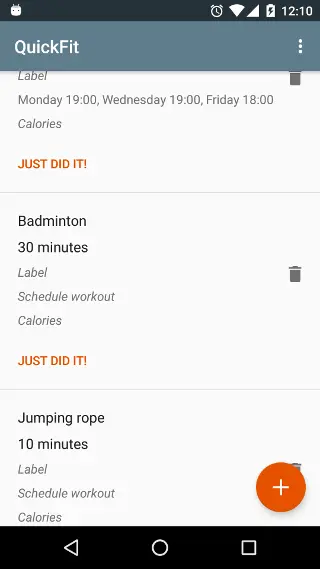
The FAB needs to be able to move out of the way, so that all parts of all list items are actually reachable. Also, it is good form in this situation to have the app bar scroll out of the way, to maximise the viewport area dedicated to the list. There’s a well-known ready-made solution for this; it looks like this

and has two disadvantages:
- it does not visually sync up well with the leaving app bar - in contrast to the scrolling AppBarLayout, the animation is not linked to the actual scrolled distance, and to me, the hiding animation is distracting while I, as a user, am focused on scrolling the list
- it does not sync up with the leaving app bar by implementation - this solution does its listening on nested scroll events and subsequent processing on its own. Together with the snapping behavior of the AppBarLayout, this can lead to states where the app bar is expanded, but the FAB hidden. This does not bode well for confused users having no idea where the FAB has gone.
Here’s how to get the FAB to move in sync with the app bar.
This is what we’re going to get:

As discussed above, listening for nested scroll events ourselves is not the right way; we want the FAB explicitely slaved to the app bar. Next try: extend the default FAB behavior, make it explicitely depend on any AppBarLayout, and react to onDependentViewChanged events by reading the new position of the AppBarLayout and displacing ourselves based on that. This does not work; on short flings that induce snapping, the onDependentViewChanged event does not fire for the later movement phases and the FAB gets stuck half way. Thankfully, AppBarLayout itself brings a solution: we can register an OnOffsetChangedListener on it, and this gives us the correct events, together with the vertical offset value.
The vertical offset value is offset in pixels relative to the fully expanded state, so values vary between 0 (fully expanded) and - appBarLayout.getHeight() (fully scrolled out). Hence, assuming that we’ve got the top position of the normally placed FAB stored in fabTopNormal, we can calculate the Y translation wanted for the FAB by
  float displacementFraction = -verticalOffset / (float) appBarLayout.getHeight();
  float fabTranslationY = (parent.getBottom() - fabTopNormal) * displacementFraction;
That’s very nice already, but not yet the full puzzle: other code may also y-translate the FAB for its own reasons. The FAB might be anchored to another view, and get translated by its parent CoordinatorLayout, or it might be a mini FAB, currently in the process of being slid out from the main FAB. So we have to track our own translation of the FAB. It would be nice to keep this code here as stateless as possible, so we don’t have to deal with saving and restoring state (edit: which is not a problem after all; there is no problem here with storing the state locally in the listener and just not saving it. So the tag usage is unnecessary.). Thanks to tags, we can just store that value with the view it belongs to. So, lets create an id resource in res/values/values.xml (or your preferred location under res/values):
<resources xmlns:tools="http://schemas.android.com/tools" tools:ignore="MissingTranslation">
    <item type="id" name="fab_translationY_from_AppBarBoundFabBehavior"/>
</resources>
and create the OnOffsetChangedListener:
public class FabOffsetter implements AppBarLayout.OnOffsetChangedListener {
    private final CoordinatorLayout parent;
    private final FloatingActionButton fab;

    public FabOffsetter(@NonNull CoordinatorLayout parent, @NonNull FloatingActionButton child) {
        this.parent = parent;
        this.fab = child;
    }

    @Override
    public void onOffsetChanged(AppBarLayout appBarLayout, int verticalOffset) {
      // fab should scroll out down in sync with the appBarLayout scrolling out up.
      // let's see how far along the way the appBarLayout is
      // (if displacementFraction == 0.0f then no displacement, appBar is fully expanded;
      //  if displacementFraction == 1.0f then full displacement, appBar is totally collapsed)
      float displacementFraction = -verticalOffset / (float) appBarLayout.getHeight();

      // need to separate translationY on the fab that comes from this behavior
      // and one that comes from other sources
      // translationY from this behavior is stored in a tag on the fab
      float translationYFromThis = coalesce((Float) fab.getTag(R.id.fab_translationY_from_AppBarBoundFabBehavior), 0f);

      // top position, accounting for translation not coming from this behavior
      float topUntranslatedFromThis = fab.getTop() + fab.getTranslationY() - translationYFromThis;

      // total length to displace by (from position uninfluenced by this behavior) for a full appBar collapse
      float fullDisplacement = parent.getBottom() - topUntranslatedFromThis;

      // calculate and store new value for displacement coming from this behavior
      float newTranslationYFromThis = fullDisplacement * displacementFraction;
      fab.setTag(R.id.fab_translationY_from_AppBarBoundFabBehavior, newTranslationYFromThis);

      // update translation value by difference found in this step
      fab.setTranslationY(newTranslationYFromThis - translationYFromThis + fab.getTranslationY());
    }

    @Override
    public boolean equals(Object o) {
        if (this == o) return true;
        if (o == null || getClass() != o.getClass()) return false;

        OnOffsetChangedListener that = (OnOffsetChangedListener) o;

        return parent.equals(that.parent) && fab.equals(that.fab);

    }

    @Override
    public int hashCode() {
        int result = parent.hashCode();
        result = 31 * result + fab.hashCode();
        return result;
    }
}
Now all that’s left is to register this listener on the AppBarLayout. We can do so imperatively when creating the view, of course (edit: and this is definitely more perfomant than what follows), but for some declarative goodness, let’s create a behavior that will do it for us:
/**
 * Behavior for FABs that does not support anchoring to AppBarLayout, but instead translates the FAB
 * out of the bottom in sync with the AppBarLayout collapsing towards the top.
 * <p>
 * Extends FloatingActionButton.Behavior to keep using the pre-Lollipop shadow padding offset.
 */
public class AppBarBoundFabBehavior extends FloatingActionButton.Behavior {

  public AppBarBoundFabBehavior(Context context, AttributeSet attrs) {
      super();
  }


  @Override
  public boolean layoutDependsOn(CoordinatorLayout parent, FloatingActionButton child, View dependency) {
      if (dependency instanceof AppBarLayout) {
          ((AppBarLayout) dependency).addOnOffsetChangedListener(new FabOffsetter(parent, child));
      }
      return dependency instanceof AppBarLayout || super.layoutDependsOn(parent, child, dependency);
  }

  @Override
  public boolean onDependentViewChanged(CoordinatorLayout parent, FloatingActionButton fab, View dependency) {
      //noinspection SimplifiableIfStatement
      if (dependency instanceof AppBarLayout) {
          // if the dependency is an AppBarLayout, do not allow super to react on that
          // we don't want that behavior
          return true;
      }
      return super.onDependentViewChanged(parent, fab, dependency);
  }
}
This behavior inherits from the default FAB behavior, and thus has to override onDependentViewChanged so as to suppress the superclass’ behavior (otherwise, because a dependency on the AppBarLayout is declared, we’d get the showing/hiding functionality depending on current height, meant for the situation where the FAB is anchored to the AppBarLayout). Use it in your layout like this:
<android.support.design.widget.CoordinatorLayout xmlns:android="http://schemas.android.com/apk/res/android"
    xmlns:app="http://schemas.android.com/apk/res-auto"
    xmlns:tools="http://schemas.android.com/tools"
    android:layout_width="match_parent"
    android:layout_height="match_parent"
    tools:context=".SomeActivity">

    <android.support.design.widget.AppBarLayout
        android:id="@+id/app_bar"
        android:layout_width="match_parent"
        android:layout_height="wrap_content"
        android:theme="@style/AppTheme.AppBarOverlay">

        <android.support.v7.widget.Toolbar
            android:id="@+id/toolbar"
            android:layout_width="match_parent"
            android:layout_height="?attr/actionBarSize"
            android:minHeight="0dp"
            app:layout_scrollFlags="scroll|enterAlways|exitUntilCollapsed|snap"
            app:popupTheme="@style/AppTheme.PopupOverlay" />

    </android.support.design.widget.AppBarLayout>

    ...

    <android.support.design.widget.FloatingActionButton
        android:id="@+id/fab"
        android:layout_width="wrap_content"
        android:layout_height="wrap_content"
        android:layout_gravity="bottom|end"
        android:layout_margin="@dimen/fab_margin"
        android:src="@drawable/morphing_add_expand_less"
        app:layout_behavior="com.lambdasoup.quickfit.util.ui.AppBarBoundFabBehavior" />

</android.support.design.widget.CoordinatorLayout>
and enjoy!
If you have comments, improvements or just want to tell me you liked this post, please express yourself on Google+, reddit or the gist!